


- Launched: an Atomic Mail app in the Zapier App Directory (currently in Beta).
- What it does: gives your Zaps a real, dedicated @atomicmail.ai inbox to send from and trigger on.
- Triggers: New Email, New Email Matching Search. Actions: Send Email, Reply to Email, Create Draft.
- Connect once: sign in with OAuth, pick an inbox, reuse that connection across every Zap.
- What you can build: an AI email agent that reads a new message, drafts a reply, and sends it on its own.
Why a Dedicated Inbox for Your Automations
Most email automation in Zapier starts by plugging in someone’s Gmail or Outlook. It works, until it doesn’t. A mailbox a person actually reads is a noisy place to run automation, the OAuth scopes are wider than you’d like, and the address was never really the workflow’s to begin with.
Atomic Mail hands the automation its own inbox instead. It’s a normal @atomicmail.ai address that can receive and reply, and it exists only for the Zap. Zapier does the orchestration and the app connections. Atomic Mail is the mailbox sitting behind them.
A Dedicated Email Inbox for Zapier
The app connects a dedicated email inbox to Zapier, kept separate from anyone’s personal Gmail or Outlook. The inbox has its own real address (and can run on your own custom domain), so outgoing mail comes from an address that belongs to the workflow, and incoming mail lands somewhere built for automation instead of daily reading.
What You Get: Two Triggers, Three Actions
Installing the app adds Atomic Mail as a trigger and action app in the Zap editor.

| Kind | Name | What it does |
|---|---|---|
| Trigger | New Email | Fires for each new message in the selected inbox |
| Trigger | New Email Matching Search | Same, filtered by a search term |
| Action | Send Email | Creates and sends an email from the connected inbox |
| Action | Reply to Email | Replies to a message and sends it in the same thread |
| Action | Create Draft | Creates a draft in the inbox without sending it |
Triggers are polling. Zapier checks the inbox on a schedule and won’t fire the same message twice. How fast it checks comes down to your plan: about every 15 minutes on the lower tiers, and as tight as 1 to 2 minutes higher up. If your Zap needs to reply quickly, that gap matters.
Connect Your Atomic Mail Account
Add the Atomic Mail app to a Zap to start sending, receiving, and replying to email across your Zapier workflows.
You authorize Atomic Mail once, and Zapier reuses the connection everywhere.
- Add an Atomic Mail step to a Zap.
- Under Account, click Select and pick your inbox (or Connect a new account to authorize one).
- Zapier signs in over OAuth. Your credentials are encrypted, and you can revoke the connection whenever you want.

Trigger: Receive Email in Zapier (New Email)
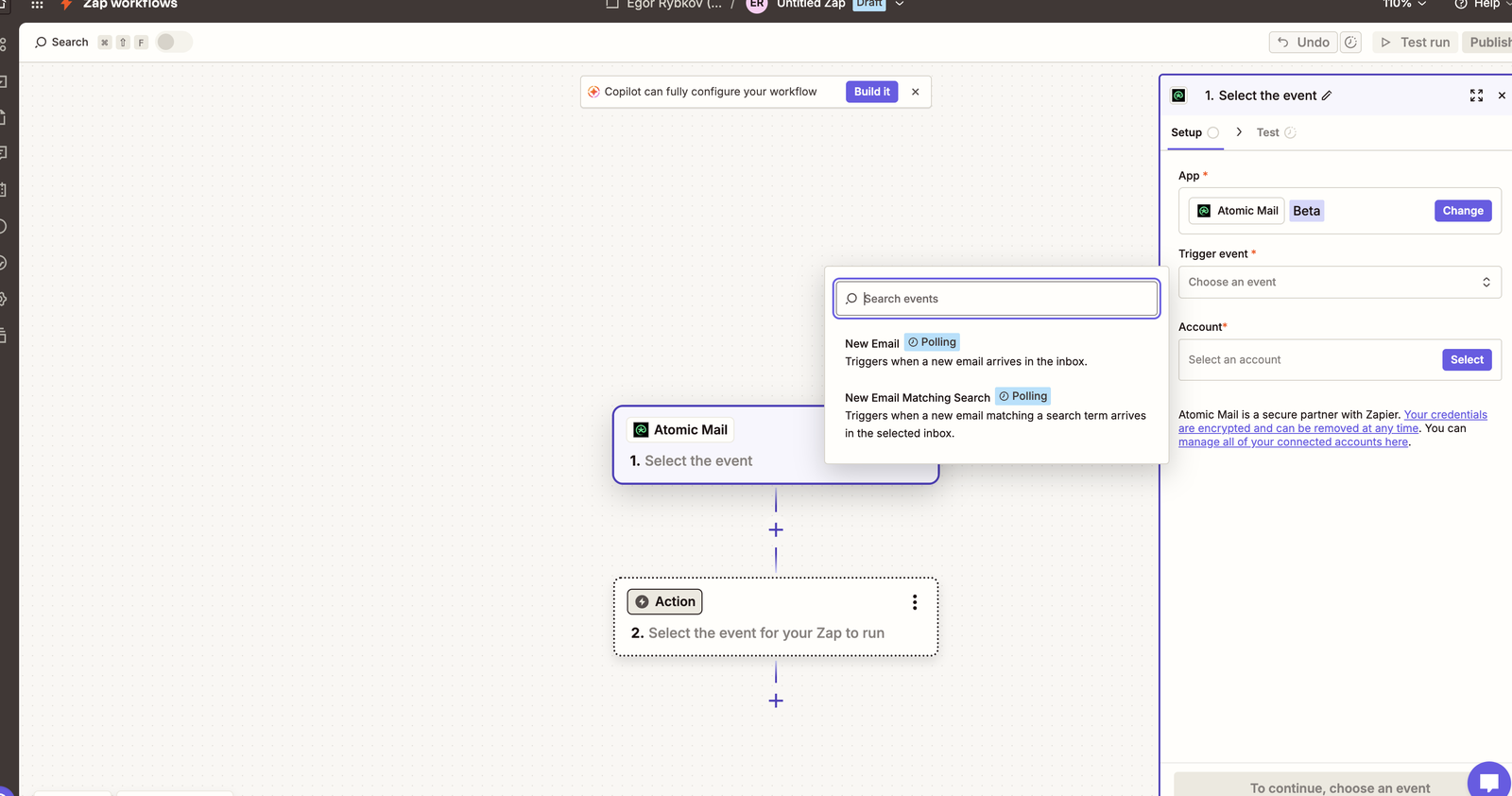
- Create a Zap and choose Atomic Mail as the trigger app.
- Pick the New Email event (or New Email Matching Search to filter).
- Select your connected inbox and continue.
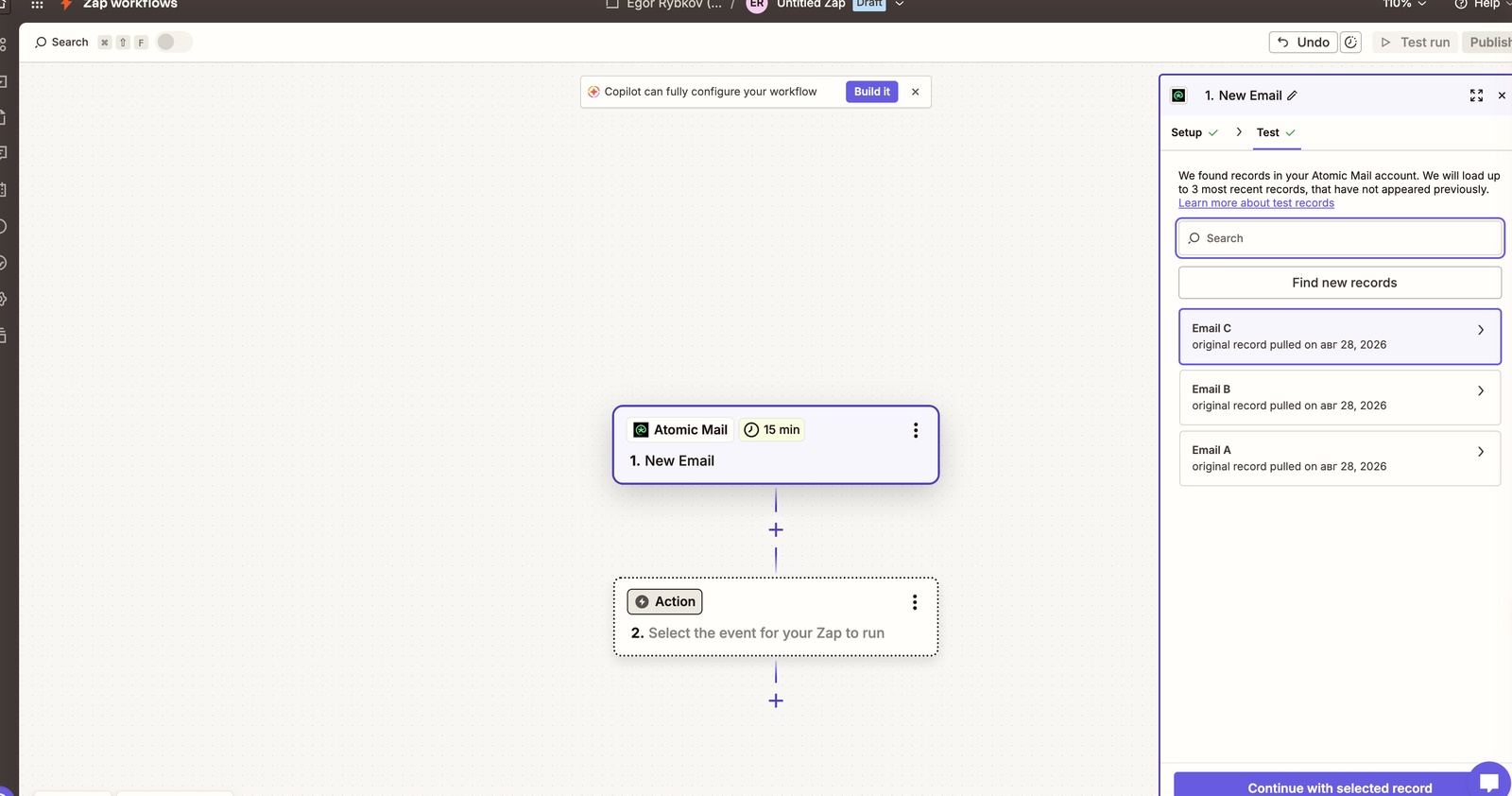
Hit Test, and Zapier pulls a few recent messages from the inbox so you have real data to map into the rest of the Zap.
Action: Send Email in Zapier (Send Email)
- Add an action step and choose Atomic Mail.
- Pick the Send Email action.
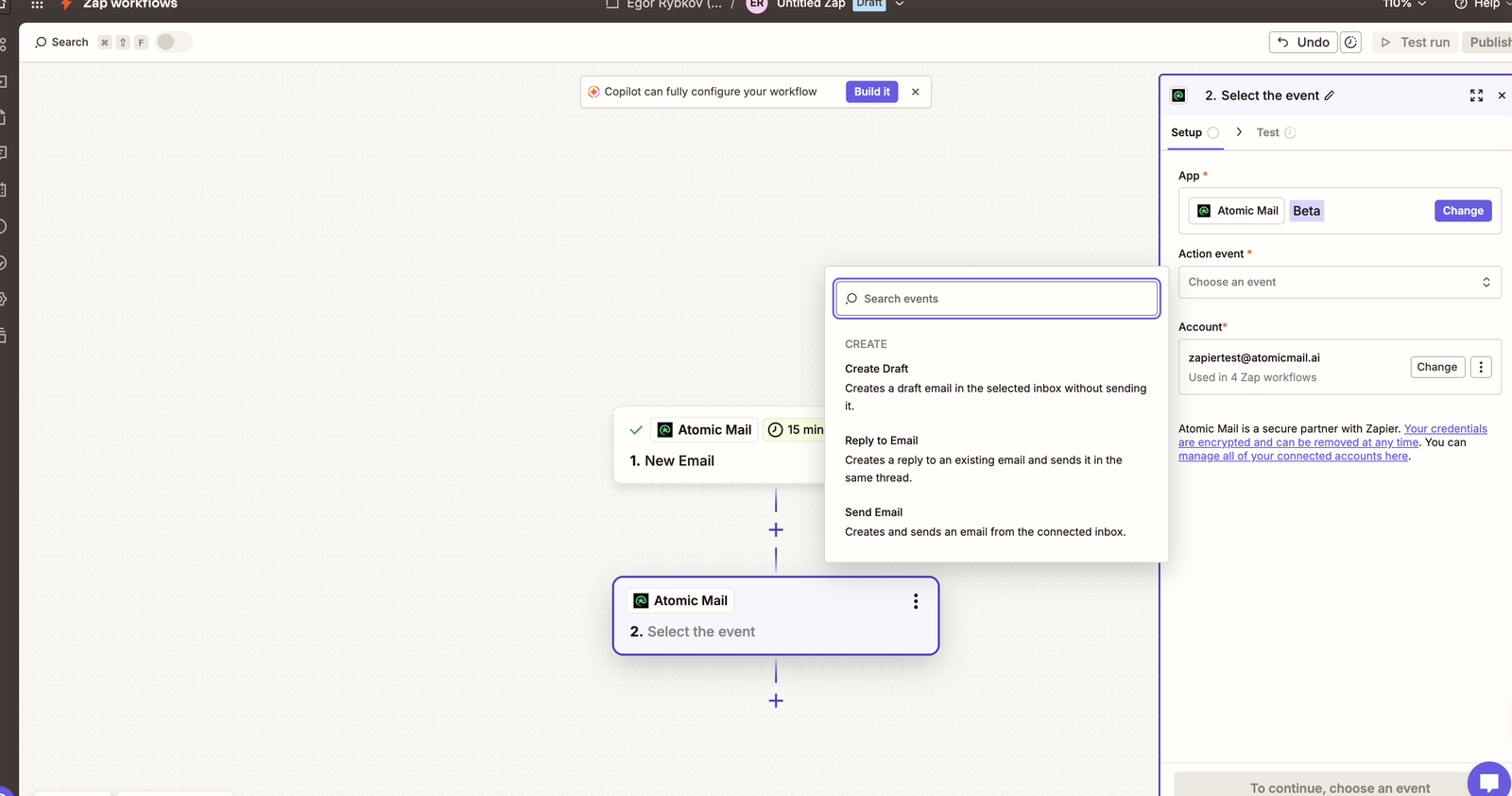
3. Fill in To, Subject, and Body. You can type them in or map fields from an earlier step.

Reply to Email and Create Draft follow the same shape. Reply threads onto an existing message by ID, and Create Draft stages something for a person to look over before it goes out.
Build an AI Email Agent
Here’s the loop worth building:
Trigger on New Email, pass the subject and body to an AI step (AI by Zapier, or a ChatGPT action), then post the drafted answer back with Reply to Email. The whole thing runs from the automation’s own inbox.
One catch worth knowing up front: Zapier charges by tasks, and every step that runs is one. A New Email → AI → Reply loop spends a few tasks on each incoming message, so a busy inbox burns through a plan’s limit fast. If your volume is high, the same inbox runs in a self-hosted n8n workflow with no per-task meter.
Atomic Mail vs. the Built-In Email Options
Zapier already touches email a few different ways. They’re built for different jobs:
| Option | What it is | Best when |
|---|---|---|
| Email by Zapier | A temporary @zapiermail.com address | Quick tests and one-off notifications |
| IMAP / SMTP by Zapier | A hookup to your existing mail server | You already run your own server |
| Gmail / Outlook | A person’s personal mailbox | The mail really is your own correspondence |
| Atomic Mail | A dedicated @atomicmail.ai inbox (custom domains supported) | Email the automation or agent should own |
Want a real inbox that sends and receives, and that belongs to the workflow rather than a person? That’s the slot Atomic Mail fills.
Use Cases
- Customer support: trigger on a new email, draft a reply with an AI step, then send it or route the tricky ones to a human.
- Lead capture: push form and lead emails into Airtable rows or ActiveCampaign contacts, and fire a confirmation from your Atomic Mail address.
- Automated follow-ups: run follow-up sequences from a dedicated address rather than a personal outbox.
- Notifications: drop important mail into Slack, or log it to a sheet.
- Agent-to-agent: give each automation its own address so they can email one another over plain SMTP.
Security
Treat incoming email as untrusted. Anyone can write to the inbox, so if an AI step acts on what it reads, decide up front what it’s allowed to do before it runs a tool or hits send. Don’t let instructions buried in an email body kick off actions on their own. And every so often, look over your connected Zapier accounts and drop any Atomic Mail connection you’ve stopped using.
Beyond Zapier
Zapier is the no-code, human-authorized way into Atomic Mail. If you’d rather the workflow register and own its inbox, or you want the raw protocol, the same inbox shows up in n8n and over JMAP.
FAQ
Does this let me send and receive email in Zapier?
Yes. The New Email trigger handles receiving, the Send Email and Reply actions handle sending, all from your Atomic Mail inbox.
Can I send email in Zapier without connecting a personal Gmail or Outlook?
Yes. Atomic Mail is its own inbox. You connect it once over OAuth, and no personal mailbox is involved.
How is this different from Email by Zapier?
Email by Zapier hands you a throwaway @zapiermail.com address. Atomic Mail gives you a real inbox you own, with its own address and custom-domain support, that sends and receives.
Can I send email from a custom domain in Zapier?
Yes. Atomic Mail supports custom domains, and the From address is always your connected inbox.
Is there a free email app for Zapier?
Zapier’s own Email by Zapier is free but temporary. Atomic Mail gives you a persistent and free inbox instead. See atomicmail.ai.
Can I build an AI email agent in Zapier?
Yes. Drop an AI step (AI by Zapier or ChatGPT) between the New Email trigger and Reply to Email, and let it classify and draft answers for you.
How often does the trigger check for new email?
On a schedule tied to your Zapier plan: about every 15 minutes on lower tiers, down to 1 to 2 minutes on higher ones. It also deduplicates, so a message only fires once.




.svg)