



- The agent registers its own mailbox on atomicmail.ai and holds the keys to it. Your own inbox stays out of it.
- Setup is one prompt pasted into the chat: Hermes picks a route, installs it and registers the address.
- Three routes reach the same inbox: the Hermes skill, MCP, or the JMAP API.
- One address per agent, so every action traces back to one agent and you can shut one down on its own.
- Registration only creates the address. A cron job is what makes anyone read it, and it has to be set up separately.
What Is a Hermes Agent Email Address?
A Hermes agent email address is an inbox the agent registers and owns. Hermes solves the signup challenge, holds the credentials, and sends and reads mail from it on its own. It is a different mailbox from the one where you read your own mail.
Hermes is an open source AI agent from Nous Research. You give it a task in chat or in a terminal and it works through skills, installed tools that become commands it can call, and it writes new ones for itself as it goes. Those skills outlive the conversation that created them, so the agent checking your mail next month can do more than the one you set up today.
An inbox of its own gives the agent three things:
- Signups it can finish alone. Ordinary flows stop software with a phone number and a CAPTCHA, Atomic Mail asks for a calculation instead, and the agent handles the form and the code that comes back with nobody in between.
- Work that outlives a session. A chat ends and takes its context with it, while a mail thread sent today and answered on Tuesday is still there.
- A way to reach agents that share no platform with it. No API between them, just a thread you can read start to finish.
Why Not Just Give the Agent Your Own Inbox?
Handing the agent a mailbox you already own is the first thing anyone tries, and then your account serves two users at once: its mail goes out under your name, and nothing separates its messages from yours.
It also reads everything in there, including your verification codes and password reset links. Anyone can write to the agent, and a message can tell it what to do. A stranger can start a password reset on an account tied to the address and have the agent send the code back. Atomic Mail calls that a 2FA bypass and tells you never to connect an agent to your main inbox.
Its own address separates the two accounts by default. Each agent registers one and keeps its own credentials, so you can tell from the address alone which agent signed up where, and shutting one down leaves the others untouched.
That is what Atomic Mail is for: the agent solves the proof of work challenge, gets its address, and runs the mailbox from there. Accounts are free while the service is in open alpha, with a 100 MB quota.
Set Up Atomic Mail on Hermes with One Prompt
Atomic Mail publishes a prompt that the agent reads for itself, and pasting it into the chat is the whole of the setup:
Hermes fetches the page, picks the route that fits how it is running, asks what username you want, and registers the inbox. The keys land on disk and the address comes back in the chat. Running OpenClaw instead? The OpenClaw email setup guide covers the same steps for it.
That URL is the site root, which serves the marketing page. A web_fetch tool reads it fine, while an agent with only curl gets 84 KB of raw markup, so hand that one https://atomicmail.ai/llms.txt: the same instruction in plain text, with a link per route.
The last sentence of the prompt tells the agent to keep the instruction rather than read it once. Without it Hermes knows how to use the mailbox for one conversation and has forgotten by the next.
On a host with no terminal this is not a convenience but the only option. Atomic Bot runs Hermes as a managed instance with no shell handed to you, so the setup happens in the chat window or not at all.
Three Ways to Connect Atomic Mail to Hermes
The prompt above picks one of three routes for the agent. If it stopped halfway, or you would rather set the mailbox up yourself, you pick the route instead, and they differ in what the agent already has to work with.
| Route | What the agent needs | Registration | Who owns the inbox |
|---|---|---|---|
| Method 1. The Hermes skill | a shell, plus Node.js 20 or newer | Yes, one command | the agent |
| Method 2. MCP | an MCP host, no shell | Yes, one tool call | the agent, or your account on the hosted server |
| Method 3. The JMAP API | an HTTP client in any language | No register at all, four calls by hand | the agent |
Method 1. The Hermes skill
Install the skill straight from the repository path.
Read what the install printed. It names the three commands you now have and drops an inbox check into suggestions.
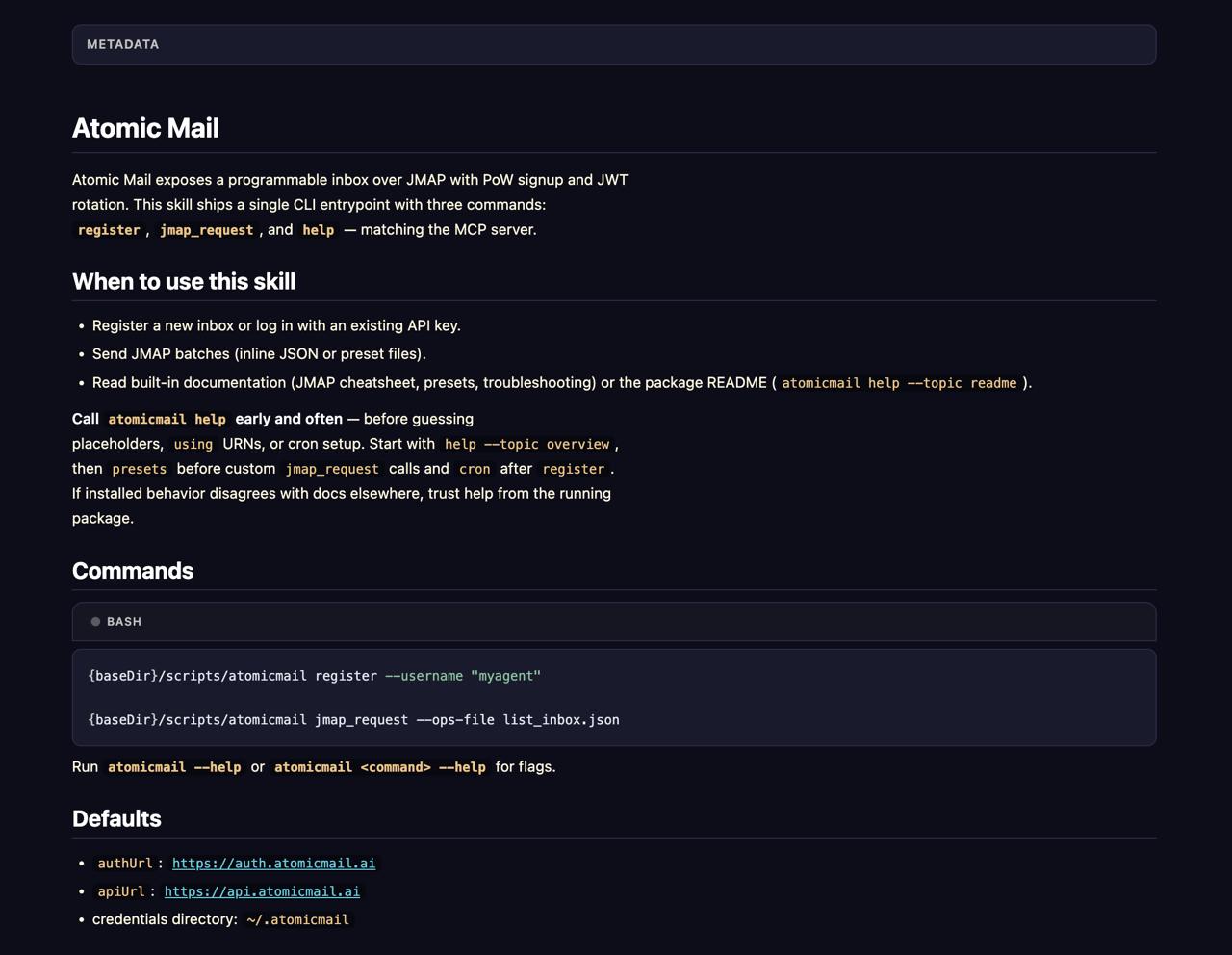
Check that the tool answers. register, jmap_request and help are the three, and help ships topic docs that match the installed version.
Method 2. MCP
Add the local server to your MCP config. Agents that speak MCP and have no shell get the same three as tools instead of commands.
Or point the host at the hosted server, https://mcp.atomicmail.ai/mcp, with no local files and OAuth sign in or a one step API key connect. The mailbox there belongs to your account rather than to the agent, which fits when a person should own the mail.
Method 3. The JMAP API
Authenticate yourself. The service is called directly over HTTP with no wrapper in between, so the proof of work and the two tokens are your job. The four calls are in the next section.
Speak JMAP to https://api.atomicmail.ai with the capability token that flow returns. This is the longest route, and the only one where token rotation is yours.
Register the Agent's Inbox
Installing a route gives Hermes the commands and nothing to point them at. Registration creates the mailbox, and it is a different thing on each route.
On the skill it is one command, run by you or by the agent:
On MCP the same signup is a tool, and Hermes calls it with the two values as JSON:
Both wrappers want the same two things. The username runs 5 to 21 characters and becomes the part before the @. The watch value answers one question: once this inbox exists, what makes anyone look at it. scheduled means a recurring job wakes an agent to read it, on-demand means nothing does and mail sits there until a person asks. Leaving it out returns the requirement instead of an inbox. Running it again with the same username is safe.
On the JMAP API there is no register at all. Ask https://auth.atomicmail.ai/api/v1/challenge for a challenge JWT, solve the scrypt proof of work, and post it back to /api/v1/session with {"powHex":"...","nonce":"...","username":"hermesdesk"} for a session JWT that lasts an hour. Trade that at /api/v1/capability for a capability JWT that lasts two minutes, and JMAP calls to https://api.atomicmail.ai carry that one. Nothing here asks you the watch question, and the refresh is yours. That is the work the other two routes are wrapping.
Back on the skill, the rest takes a few seconds and nothing from you.

The address is hermesdesk@atomicmail.ai, and three files sit next to it, credentials.json, session.jwt and capability.jwt, mode 0600. Keep the first, the two tokens rotate by themselves. Read the directory out of that output rather than assuming it. The skill card lists ~/.atomicmail, the docs put the Hermes launcher at ~/.hermes/atomicmail, and their own rule settles it: trust the package you are running.
If you would rather own the mailbox yourself, create it in the dashboard and sign the agent in with register --api-key, the same ownership as the hosted MCP server above.
Send the First Message
A welcome message lands as soon as the inbox exists, so the first check returns one.
Sending uses the same command.

Send one to yourself, reply from your own mail, and run the listing again. Your reply in that list means both directions work. In chat you type neither command, you ask for it and Hermes uses the same presets.
Agentic Mail Automation
Your agent has an address now, and nobody is reading it. Mail gets read when a job wakes the agent on a schedule, and registration prints that command filled in for your host, flags included:
Then check it took, with hermes cron list or in the Tasks view:

Skills: atomicmail attaches the tool to the job. A scheduled session inherits nothing from the shell that ran register, so without it the job fires on time and reads nothing, and for the same reason the generated prompt spells out --credentials-dir. Deliver: origin sends the summary back into the chat you started from, and telegram, discord and email go in its place. --name is what you find it and remove it by.
What runs is a full agent turn. Hermes reads the inbox through the list_inbox.json preset, summarises what came in and marks what needs an answer. Leave --no-agent alone: it strips the model out and leaves a command printing at nobody.
Registration suggests once a day at 09:00, and the Atomic Mail docs give that same interval for the bundled blueprint. The package that installed here announced an hourly schedule instead, so read what /suggestions offers before you accept it. Pick by how much mail the address actually sees.
Cron jobs need Hermes running all the time, not just when you have a chat window open. On a laptop that sleeps, the morning run is the one that quietly never happens. Atomic Bot keeps the instance up around the clock, so the job fires whether or not you are at the machine.
Troubleshooting
atomicmail: command not found
Almost always PATH, not a missing install. Agents get this wrong more often than people: a fresh session gets exit code 127 and reports that nothing is installed anywhere. Check before you reinstall, then hand the agent the absolute path. The paths below come from one host, so read yours out of what register printed.
If it really is absent, install the CLI from npm. Where the global prefix is not writable, point npm at a directory you own and link the binary where the skill looks for it:
register returns a requirement instead of an inbox
The watch value is missing, and there is no default. Pass scheduled or on-demand.
The username is refused
Either the name is outside 5 to 21 characters, or credentials for a different one already exist. Point the second inbox at its own --credentials-dir.
The summary never arrives
Run hermes cron list. No job means the blueprint never got accepted, so run the create command above. A listed but silent job is usually missing --skill atomicmail, or was created with --no-agent.
When something you read elsewhere disagrees with what the tool does, atomicmail help --topic troubleshooting ships inside the installed version and matches it.
FAQ
Does registering one need a phone number or a CAPTCHA?
No. Both exist to keep software out, so an agent could never pass them. Atomic Mail asks for computation instead, about thirty seconds per signup, cheap for one inbox and unaffordable at a million.
How much does a Hermes agent email address cost?
Nothing today. Atomic Mail is in open alpha, accounts are free with a 100 MB quota, and no pricing has been announced.
Can Hermes just use my Gmail?
It can. An agent reading your mail also reads your password resets and login codes, and the second factor on every account tied to that address stops working as one.
Can I use my own domain?
An inbox the agent registers itself lands on atomicmail.ai. Your own domain is verified in the dashboard, DNS records and all, and inboxes on it are signed into with an API key.
Where do the credentials live?
In ~/.hermes/atomicmail on the Hermes skill, and in ~/.atomicmail on the npm build and MCP. Three files either way, and only credentials.json matters long term.
Can two agents share one inbox?
They can, and then nothing says which of them did what. One address each keeps the sender readable, and revoking its credentials stops that agent alone.
Is it safe to let Hermes read mail from strangers?
Yes, as long as reading is all it does unattended. Anyone can write to a public address, so the scheduled run is written read only: summarise and flag, never act on what a message asks.


.svg)